Adding a host to VCSA
Here is how to add a host to VCSA (vCenter Server Appliance specifically version 7)
- Right click on the location where you want to add the host and click Add Host
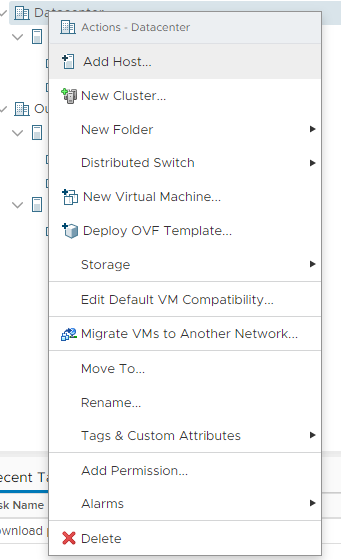
Here is how to add a host to VCSA (vCenter Server Appliance specifically version 7)
Here is how to change the host name in ESXi (specifically ESXi 7)



There have been a lot of critical exploits over the last few months. Really the best way to deal with that is Windows Updates. Now I can hear you complaining that Windows Updates left untamed will just reboot your servers randomly or I don’t want to build WSUS or my RMM doesn’t patch well and it sucks and <insert your excuse here>.
Well I’ve created a PowerShell script that I called DK Win Updates that will help solve the issue. It uses the Windows Update Agent API to search for updates and guess what you can run this as .ps1 file, you could build a scheduled task to run it, you can toss it in your RMM and run it as a script. (if your RMM can’t do that, you should find a new RMM).
…
show version, show flash, and show config files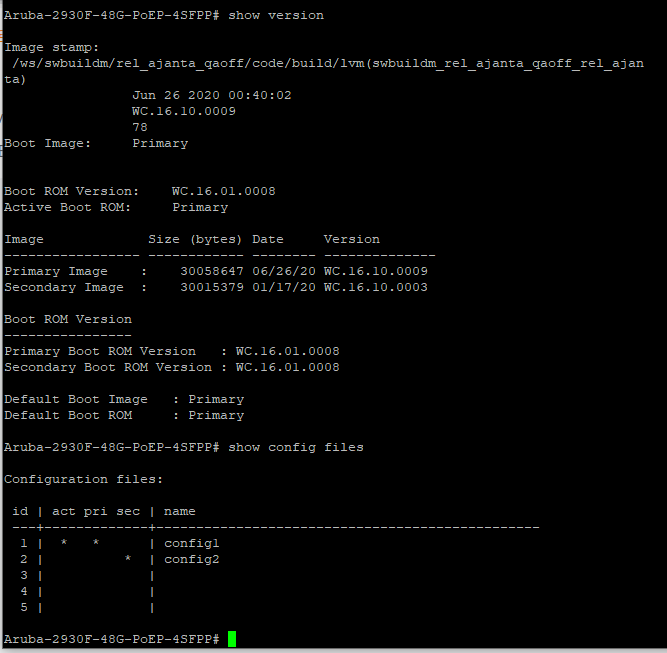
Auto Windows updates are annoying especially when left untamed as it will automatically reboot the device be it a workstation or a server. I’ve written a script that can mass disable Windows updates across all devices even if they aren’t domain joined.
Technically you could go in and disabled the Windows Update service but that stops all Windows updates. I don’t think that’s a good idea.
Another way would be to bring up Group Policy Editor and go to Computer Configuration > Administrative Templates > Windows Components > Windows Updates > Configure Automatic Updates and set that to be disabled.
However that option will work for domain joined devices but what about the non domain joined devices. It doesn’t make much sense to go to each device and manually edit the setting via the Local Group Policy Editor. To solve this issue I’ve written a script that could be ran across all devices including domain joined device and would leave other Windows updates settings in place.
…
Recently I came across an issue were multiple HP systems that had a fresh install of Windows 10 Pro 1703 from a known working ISO and then upgraded to 1709. Once on 1709 the audio drivers wouldn’t work at all and if you tried to install the correct driver from HP it still wouldn’t fix it. Even manually specifying the correct driver wouldn’t fix it. It’s possible that this issue isn’t solely linked to HPs, however they are the only ones I’ve seen with this issue so far.
I’ve noticed this issue on the following HP systems:
I got tired of having to manually edit ADSI values for more then one user so I wrote a PowerShell script to automate the process. I even went to the extent to include a display of the values that were changed at the end. The main purpose of this script was to edit the msExchHideFromAddressLists value when the user is placed in a specific OU. I ended up deciding to make my script in a way so that I could just change 3 values and it will do all the work.
Here’s the script.
$value = "msExchHideFromAddressLists"
$ou = "OU=Disabled Users,OU=Contoso,DC=contoso,DC=local"
$yesno = $true

$search = Get-ADUser -filter * -searchbase $ou

Foreach ($U in $search) {
Set-ADUser $U -replace @{$value=$yesno}
}

Write-Output "Results"

Get-ADUser -filter {($value -eq $yesno)} -searchbase $ou -properties $value | Select-Object UserPrincipalName, $value
Code language: PowerShell (powershell)
Just alter $value, $ou, and $yesno to suit your needs and the script does the rest.
The process detailed below has been deprecated by Microsoft. An updated version of this process is detailed in my post called Swap Microsoft 365 Licenses with Microsoft Graph.
I needed to remove some expired Office 365 licences that were expired to the point where I couldn’t do it via the admin interface so I wrote a PowerShell script to automate swapping the Office 365 licences.
You will want to run Get-MsolAccountSku this will list out the various SKUs your account has. something like this
tenant:VISIOCLIENT
 tenant:PROJECTCLIENT
 tenant:EXCHANGESTANDARD
 tenant:O365_BUSINESS_PREMIUM
 tenant:OFFICESUBSCRIPTION
 tenant:PROJECTPROFESSIONAL
Just change the values in the script below to match what product you want to remove and replace it with and then run it.
$remove = "tenant:EXCHANGESTANDARD"
$add = "tenant:O365_BUSINESS_PREMIUM"

$swap = get-MSOLUser -All | where {$_.isLicensed -eq "TRUE" -and $_.Licenses.AccountSKUID -eq "$remove"}

Foreach ($User in $swap) {
Set-MsolUserLicense -UserPrincipalName $User.UserPrincipalName -RemoveLicenses "$remove" -AddLicenses $add
}
Code language: PowerShell (powershell)
That is basically it. It will just run and swap the licences.


