geoSCOUT 8.17 Launcher Upgrade
With the release of geoSCOUT version 8.17 geoLOGIC upgraded the geoSCOUT launcher but only included an upgrade file that needs to be ran as admin on each system and under each user account. Which is annoying in company setups where users don’t have local admin.
Technically speaking geoSCOUT still works even if you don’t run the geoSCOUT 8.17 launcher upgrade, the users just don’t get some of the new features and that’s not fun.
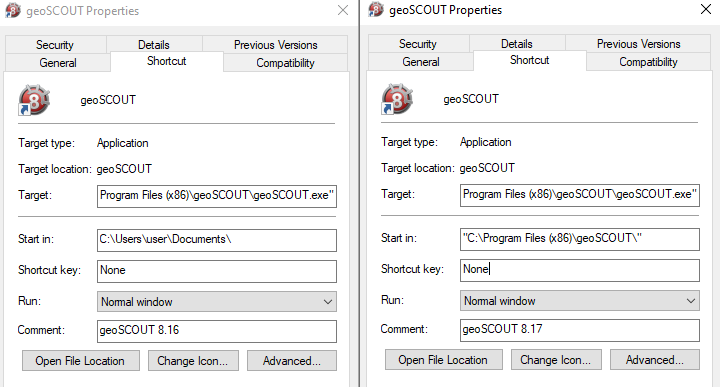
One of the changes geoLOGIC made with geoSCOUT 8.17 is the shortcuts. In the past the shortcuts would be set to start in the user’s documents folder but now they are set to start in program files.
Typically a program needs to run as admin when it is changing things beyond what a normal user account can change like system settings or files. With the 8.17 geoSCOUT launcher it is updating the geoSCOUT exe in program files and updating the system wide start menu shortcut with the updated start in info.
…