HPE iLO Firmware Upgrade
HPE iLO (Hewlett Packard Enterprise Integrated Lights-Out) is a wonderful tool when your servers are remote. It’s important to keep it up to date as if not properly secured it could be a risk of compromise to your environment.
In this post, I’ll show step-by-step how to update the HPE iLO firmware on your server. This will cover iLO 5 specifically however, older versions of iLO will follow a similar process.
The Process
- Download the latest iLO firmware from HPE.
- Login to iLO.
- Click on Firmware & OS Software
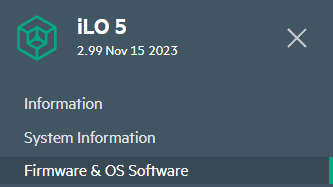
- Click Update Firmware

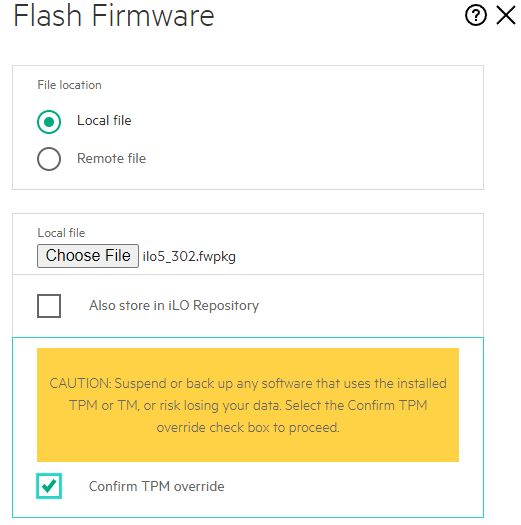
- Select the iLO firmware file you downloaded from HPE.
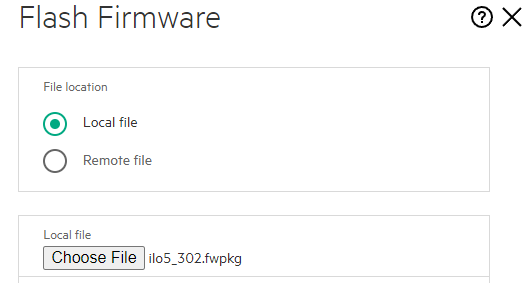
If you have a TPM you will see a warning saying CAUTION: Suspend or back up any software that uses the installed TPM or TM, or risk losing your data. Select the Confirm TPM override check box to proceed.
Double-check your OS documentation to see if there is a risk of data loss and if you should be disabling items like BitLocker first.
It’s normal to not see this if you don’t have a TPM. If all is safe then select Confirm TPM override.