Duo Authentication Proxy Upgrade
Duo Authentication Proxy is a very useful way to add MFA to LDAP and RADIUS. It is also a way to sync your users with Duo. You can install Duo Authentication Proxy on Windows or Linux.
While older versions of Duo Auth Proxy typically keep working, a Duo certificate expires in February 2026, and you will need to upgrade to version 6.5.1 or higher to avoid being affected.
In this post, I will show you step by step how to upgrade the Duo Authentication Proxy for Windows.
The Process
- Review the release notes for each Duo Authentication Proxy version between your current and target versions.
Here are the Duo Authentication Proxy release notes.
- Check the Duo documentation to confirm if you can upgrade directly to the target version.
Typically, you can skip versions when upgrading, but some versions introduce changes that may affect compatibility or functionality, and not all upgrades are backwards compatible. Here is the Duo documentation about skipping versions of the Duo Auth Proxy.
- Download the new version of the Duo Authentication Proxy.
An always current URL you can use is https://dl.duosecurity.com/duoauthproxy-latest.exe
- Connect to your Duo Auth Proxy server.
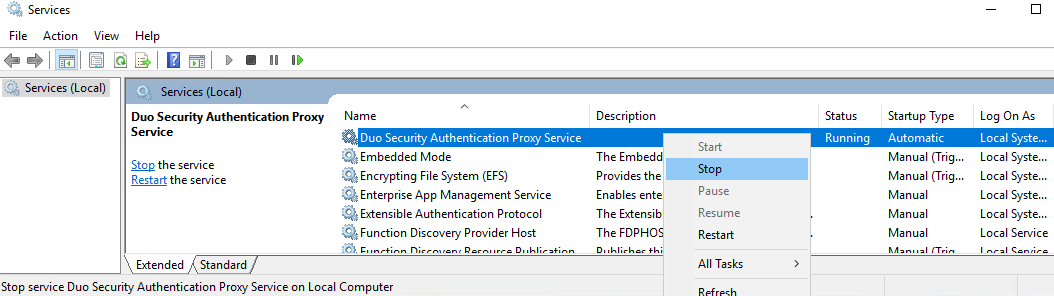
- Open Services.

- Stop the service named Duo Security Authentication Proxy Service.
- Back up the
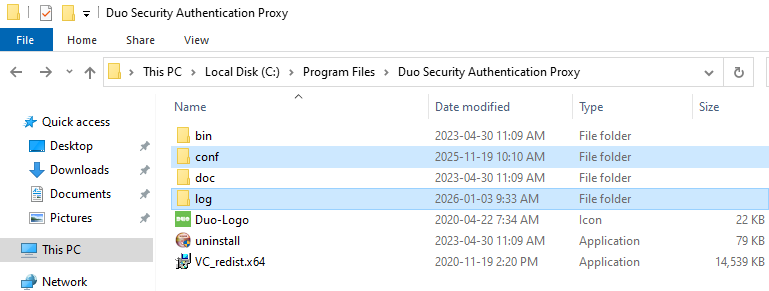
confandlogfolders of the Duo Auth Proxy installation.
Typically, they are located in the C:\Program Files\Duo Security Authentication Proxy folder.
Store the backup securely, as it contains your configuration’s passwords and secrets.