Install or Upgrade Duo Authentication for Windows Logon
In this post, I will show you how to use my Duo Authentication for Windows Logon PowerShell scripts to check whether Duo Win Logon is installed, install Duo Win Logon, or upgrade Duo Win Logon.
Previously, I wrote the blog post Upgrading Duo Authentication for Windows Logon. That blog post covered how to upgrade Duo Win Logon using the MSI. However, later on, Duo changed Duo Win Logon enough that the application now requires Microsoft Visual C++ 2022 Redistributable, which is not bundled with the MSI installer but is bundled with the EXE installer.
Another limitation of the MSI deployment is that you need to create a transform file to silently install Duo Win Logon. With the EXE installer version of Duo Win Logon, you can specify everything with silent install arguments.
The PowerShell Scripts
Duo-Win-Logon-Checker.ps1
The first PowerShell script checks if Duo Win Logon is installed and reports its version. It is a refactored version of the duo-checker function from the Duo Win Logon MSI upgrade script.
The script uses the Prog-Finder function from the Install Matrix project.
It also tells you if the version of Duo Win Logon is old. For the old version detection to work correctly, you will need to edit the NewVersion variable. You can check for Duo Win Logon releases by reviewing the Duo Win Logon release notes.

Duo-Win-Logon-Install.ps1
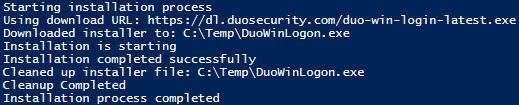
This script uses various functions from the Install Matrix project to install Duo Win Logon.
For this script to work, you will need to edit the InstallArgs variable.
Example
[string]$InstallArgs = '/S /V"REBOOT=ReallySuppress /qn IKEY="IKEY_HERE" SKEY="SKEY_HERE" HOST="API_HOST_HERE" FAILOPEN="#0" RDPONLY="#0""',Code language: PowerShell (powershell)- Replace
IKEY_HEREwith your Duo Win Logon IKEY. - Replace
SKEY_HEREwith your Duo Win Logon SKEY. - Replace
API_HOST_HEREwith your Duo Win Logon API hostname.
The other arguments are to ensure Duo Win Logon fails closed if the Duo API can’t be reached and to protect RDP and console logins.
If you want to add more options, here is the Duo support article that lists all the silent switches.
The script also uses the always-current URL for Duo Win Logon, which is https://dl.duosecurity.com/duo-win-login-latest.exe
Duo-Win-Logon-Upgrade.ps1
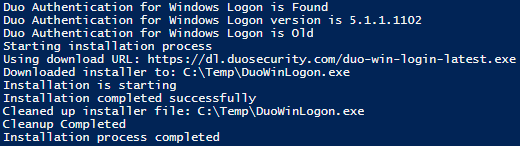
This script combines Duo-Win-Logon-Checker and Duo-Win-Logon-Install into a single script that first checks whether Duo Win Logon is installed, then checks whether it is an old version. If it is an old version, it upgrades Duo Win Logon.
You will also need to set the NewVersion variable to the Duo Win Logon version you are upgrading to.
As with the Duo-Win-Logon-Install script, you will need to edit the InstallArgs variable. Replace IKEY_HERE, SKEY_HERE, and API_HOST_HERE with the values needed for your Duo Win Logon deployment.
Summary
To avoid unexpected reboots during a Duo Win Logon install or upgrade, both Duo-Win-Logon-Install and Duo-Win-Logon-Upgrade scripts suppress the reboot requirement. You should still plan a reboot during your maintenance window.
All three scripts can help you install or upgrade Duo Authentication for Windows Logon. I have used each for various installations and upgrades.
You can find all 3 scripts on my GitHub. https://github.com/thedxt/Duo



One thought on “Install or Upgrade Duo Authentication for Windows Logon”