
OneDrive Shortcuts
A while back, Microsoft added a feature to SharePoint Online called Add shortcut to OneDrive. This feature adds a shortcut to the file or folder in another SharePoint site directly in your OneDrive. The Add shortcut to OneDrive feature is on by default.
Depending on your setup, you may want to turn the Add shortcut to OneDrive option on or off for your SharePoint sites.
Enabling or disabling the Add shortcut to OneDrive setting isn’t a per-site option, it is a global option. If you turn it off, it won’t break any existing OneDrive shortcuts it only prevents the creation of future shortcuts.
In this post, I will show you step-by-step how to check the status of the Add shortcut to OneDrive feature and how to turn it off or on.
Prerequisites
- The SharePoint Online Management Shell is installed. Here is the Microsoft documentation for how to do that.
The Process
- Connect to SharePoint Online using the
Connect-SPOServicecommand with the URL for your SharePoint admin center.
The command should look something like this Connect-SPOService -Url https://contoso-admin.sharepoint.com

- Run the following command to check the status of the Add shortcut to OneDrive feature.
Get-SPOTenant | format-list DisableAddShortCutsToOneDrive
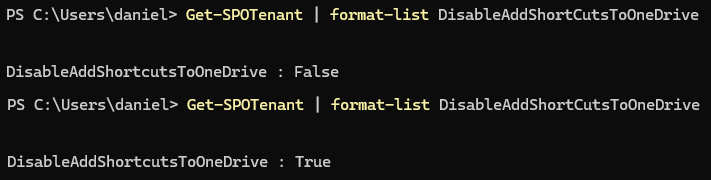
If the returned value is false, then OneDrive shortcuts can be created. If the returned value is true, then OneDrive shortcuts can not be made.
Disable Add shortcut to OneDrive
- Run the following command to disable the Add shortcut to OneDrive feature.
Set-SPOTenant -DisableAddShortCutsToOneDrive $True

- Run the following command to confirm that the Add shortcut to OneDrive feature is disabled.
Get-SPOTenant | format-list DisableAddShortCutsToOneDrive
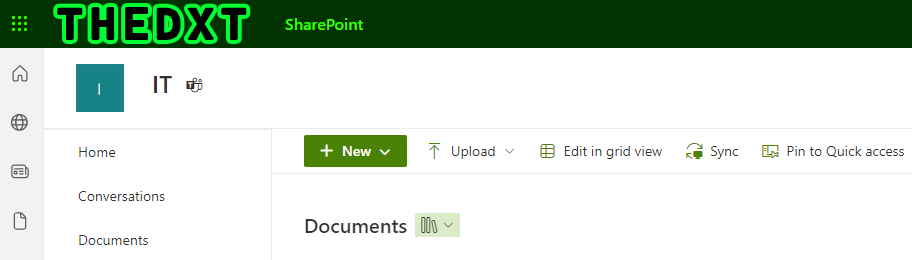
The returned value for DisableAddShortCutsToOneDrive will be True.

You can also check if the Add shortcut to OneDrive feature is disabled by going to a SharePoint site and checking if the GUI option for Add shortcut to OneDrive is missing.
Enable Add shortcut to OneDrive
- Run the following command to enable the Add shortcut to OneDrive feature.
Set-SPOTenant -DisableAddShortCutsToOneDrive $False

- Run the following command to confirm that the Add shortcut to OneDrive feature is enabled.
Get-SPOTenant | format-list DisableAddShortCutsToOneDrive
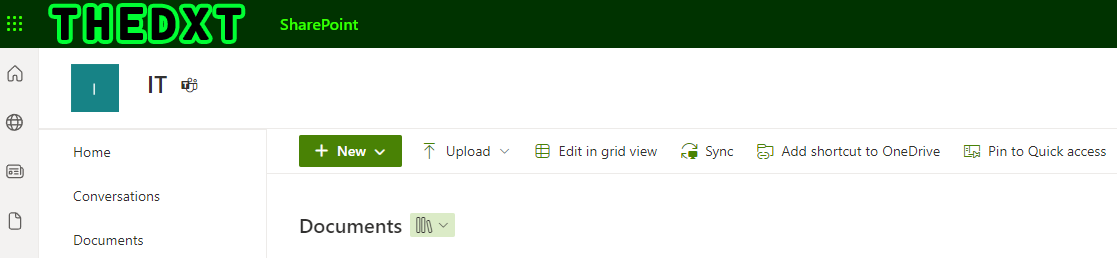
The returned value for DisableAddShortCutsToOneDrive will be False.

You can also check if the Add shortcut to OneDrive feature is enabled by going to a SharePoint site and checking if the GUI option for Add shortcut to OneDrive is listed.
If you want to read more about the Add shortcut to OneDrive feature, here is the Microsoft documentation.